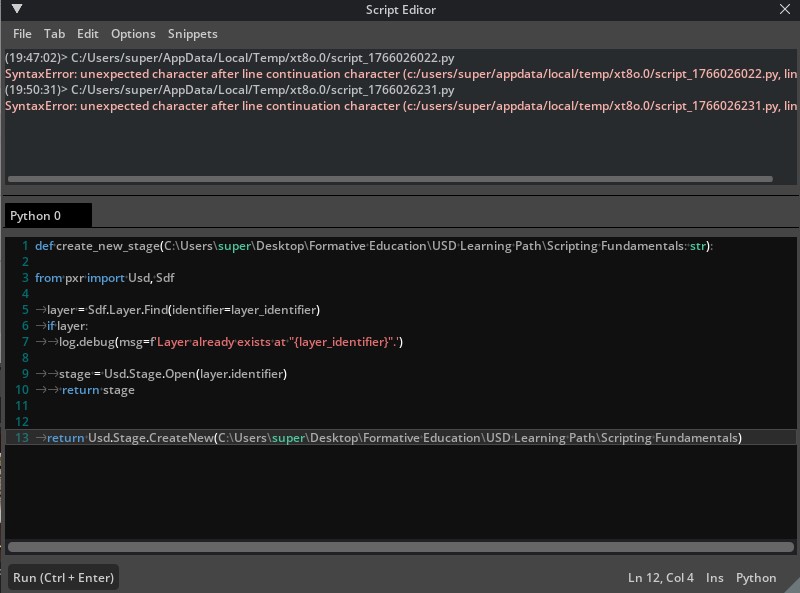
I find that my trouble at the moment lies in creating, populating, and saving a usd stage via python scripting. For personal experimentation purposes, I have been attempting to do so via the python console in the NVIDIA Omniverse USD Composer, VS Code, Blender Script Editor, and Miniconda through the terminal.
However, I find that I am running into syntax errors through each of these methods. I understand trouble in establishing a scripting directory and saving a .usda stage in python is truly a beginner struggle.
In an effort to to match my ambitions with the possibilities of USD, I ask for any assistance, as it would be very much appreciated.
Error in ‘pxrInternal_v0_25_2__pxrReserved__::SdfLayer::_CreateNew’ at line 600 in file C:\g\207190794\USD\pxr\usd\sdf\layer.cpp : ‘A layer already exists with identifier ‘C:/OMUSD/kit-app-template/_build/windows-x86_64/release/sphere.usda’’
Ah, yes. So there is already a “sphere.usda” created at that location. This is can happen in learning situations like this where you’re experimenting and running the same script multiple times. One option is to just delete the file and run the script again. Another option is to use Usd.Stage.CreateInMemory() so you have more control over when the file is written. Lastly, you could try something like what we do here in Learn OpenUSD to open the file instead of creating it if it already exists: LearnOpenUSD/src/utils/helperfunctions.py at main · NVIDIA-Omniverse/LearnOpenUSD · GitHub
Oh, I see. Thank you for your understanding, Mati.
Interestingly enough, my scene never populated with the sphere prim. Or, is it that I’m pulling redundant data from the USD Composer prefabs? Please don’t hesitate to correct me if my idea here is mistaken.
Usd.Stage.CreateInMemory(), this seems to be an incredibly useful approach to the matter…
And also, thank you for linking me to the LearnOpenUSD helper functions! I’m afraid that I’m receiving some rookie syntax errors here. Would you mind pointing towards a little bit of correction?
For Kit-based apps, you’re not necessarily authoring to the stage you’re seeing in the viewport when you use Usd.Stage.CreateNew() or Usd.Stage.Open(). If you want to continue using Kit while you learn, I’d recommend using this to get the current loaded stage:
Then you can continue with the rest of the code from the examples using that stage. Doing it this way, you can also use File->New and File->Save menu items in the main window to clear the stage or save your work. Additionally, working this way you won’t need to worry about the initial error you hit or using that helper function.
For any syntax errors you’re encountering, this is primarily a challenge with learning Python. I’d recommend using an LLM as a learning companion to help you fix the errors and explain the errors to you as you go along.