Hi experts,
For attached usd files reference.zip (6.5 KB), API SdfLayer::ComputeAbsolutePath(const std::string& assetPath) doesn’t work for the following asset path in red. Is there any other API works?
My c++ code:
pxr::SdfLayerRefPtr pLayer = pxr::SdfLayer::FindOrOpen(assetPath); // absolute path for “Primitives.geom.usda”
auto assetRelativePaths = pLayer->GetCompositionAssetDependencies();
for (const auto& assetRelativePath : assetRelativePaths)
{
std::filesystem::path sPath(assetRelativePath);
if (sPath.is_relative())
auto absPath = pLayer->ComputeAbsolutePath(assetRelativePath); // absPath still is “assets/mtl/materials.usda”
}
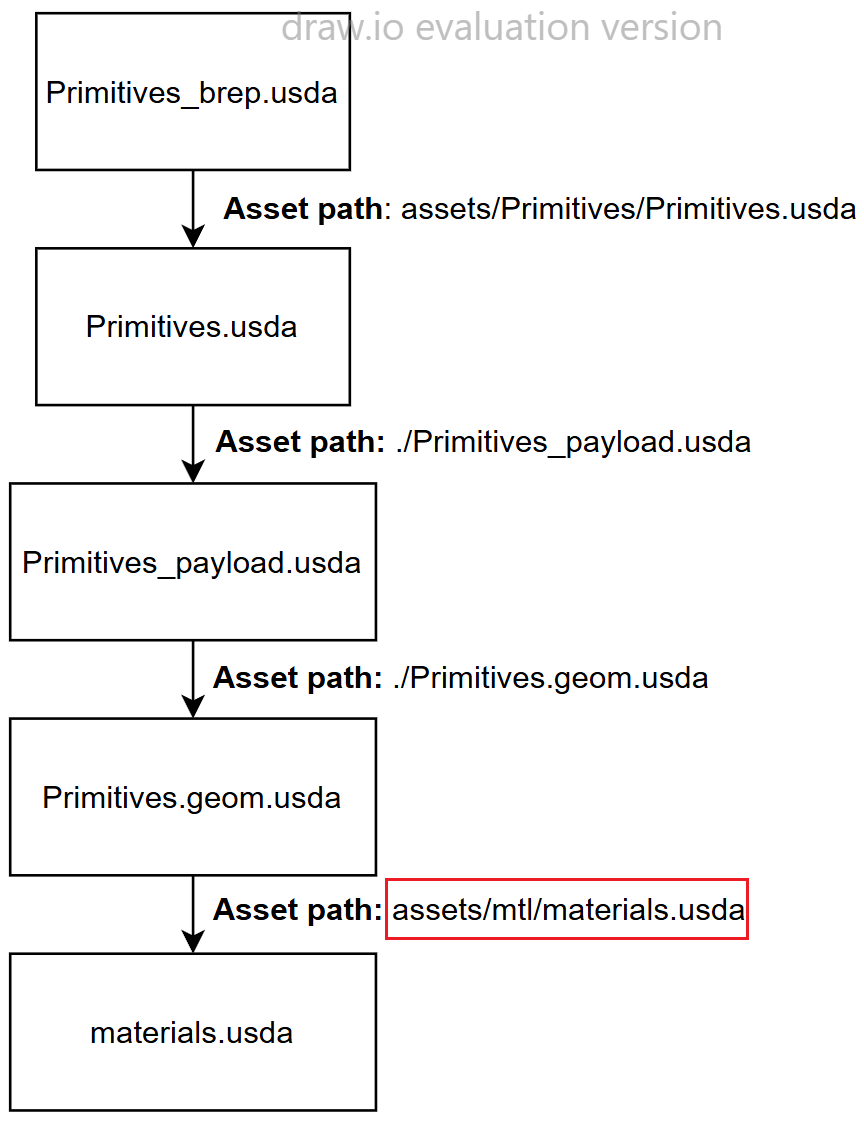
This is because your relative paths aren’t locatable when traversed from your anchors layer (pLayer in your case).
If you change your authored path from assets/mtl/materials.usda to ../mtl/materials.usda it will work.
Think of ComputeAbsolutePath as taking the current directory path of your layer and building based off of there (also does a few other things but lets ignore those for now)
assets/Primitives/Primitives.geom.usda cannot find assets/mtl/materials.usda because it would resolve to assets/Primitives/assets/mtl/materials.usda which doesn’t exist.
Thank you! That works.